
Rejected, or still checking?
HMRC has the return and is still checking it. This is not a rejection. means you only need to wait and choose Check with HMRC later.
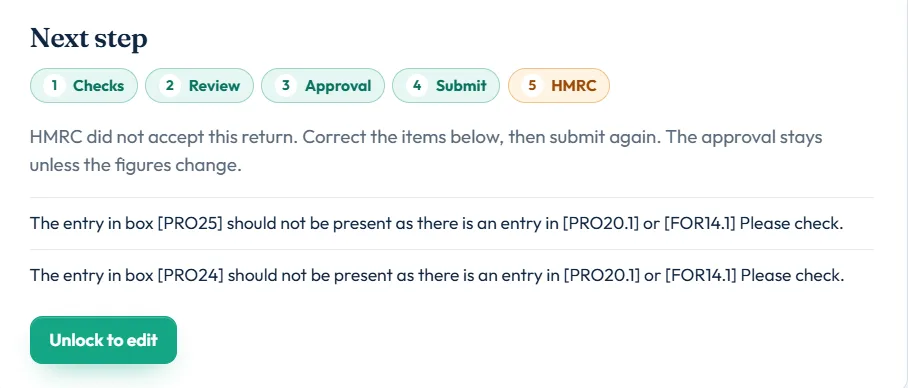
HMRC did not accept this return is a rejection. The next step names what to correct.
A message starting HMRC rejected the SOAP credentials is a login problem, not a problem with your figures. See error 1046.
How to fix and resubmit
- Read the reasonsOpen the filing desk. Under Next step you see HMRC did not accept this return. Correct the items below, then submit again. Each reason is listed in plain English, or in HMRC’s own words.
- Unlock the returnChoose Unlock to edit and confirm. You see Unlocked. Correct the return and submit again.
- Correct the figuresUse the Fix link next to a reason to go to the right box, or open the page it names.
- Clear the checksBack on the desk, check the filing checks are all clear.
- Submit againChoose Submit to HMRC. Accountants: if the figures changed, the client must approve again.
Common rejection reasons
| Code | What it means | Fix |
|---|---|---|
| 6254 / 6269 | The partnership reference on SA104 fails HMRC’s UTR check | Enter the partnership’s 10-digit UTR on the SA104 |
| 8205 | A partner UTR on the partnership statement fails HMRC’s check | Enter the partner’s 10-digit UTR from their HMRC notice |
| 8518 / 8519 | Property expenses (box PRO24 or PRO25) entered as well as the property income allowance (PRO20.1) | Claim the allowance or the expenses, not both. See property income allowance |
| 6906 | Partnership statement box 13 does not equal SA804 box 7.6 | Make the untaxed UK savings totals match |
| 6699 / 6901 | Statement period start or end does not match the trade period | Make the dates match |
| Other codes | HMRC’s own wording is shown | Correct the box it names, then resubmit |
Rejections and the deadline
HMRC counts a return as filed only when it is accepted. If yours is rejected close to 31 January, correct and resubmit straight away. If you cannot, HMRC may accept a reasonable excuse for a late return; see the deadline guide.
Still stuck?
- HMRC have accepted this return. Start an amendment to edit it. The return was accepted, not rejected: amend it instead.
- HMRC no longer has that submission. Unlock the return and submit it again.
- The reason is unclear? Contact us with the HMRC wording shown on the desk.
Still not sorted? Contact us and tell us the page, the tax year and any message you see.
Questions answered
Why was my Self Assessment rejected?
HMRC found something it could not accept, such as a UTR that fails its check or figures that do not agree. The filing desk lists each reason.
Is a rejected return filed?
No. HMRC only treats the return as filed once it is accepted. Correct it and submit again.
Do I pay again to resubmit?
No. The filing for that tax year is paid once.
Does my client need to approve again?
Only if the figures change. The approval stays if you resubmit the same figures.
What is the difference between rejected and still checking?
Still checking means HMRC has not finished. Rejected means HMRC did not accept the return and you need to correct it.
Official sources
These guides explain how HMRC's rules apply in Self Assessment Software. Check GOV.UK for your own circumstances.