
Where to find the checks
Open the return and go to the File step, or open File with HMRC. The desk shows the five stages and a list of checks, each ticked or needing a fix.
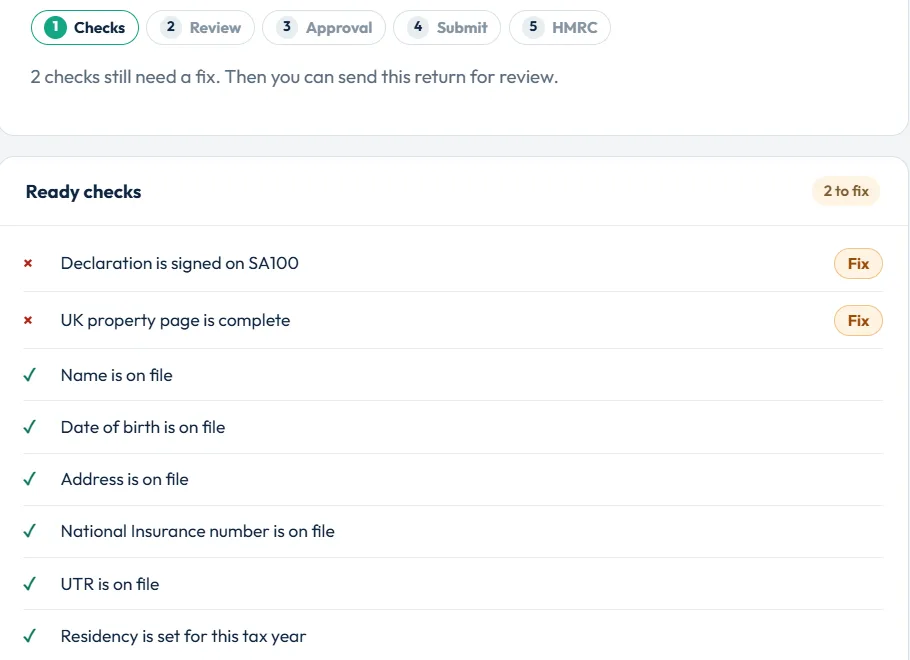
Personal detail checks
| Check | How to clear it |
|---|---|
| Name is on file / Date of birth is on file / Address is on file | Complete personal details (or client details). |
| National Insurance number is on file | Add the National Insurance number, e.g. QQ 12 34 56 C. |
| UTR is on file | Add the 10-digit UTR. See how to find your UTR. |
| Residency is set for this tax year | Answer the residence question at the start of the return. |
| Client email is on file | Accountants: add the client’s email so they can approve the return. |
Return and page checks
| Check | How to clear it |
|---|---|
| Tax calculation is available | Complete enough of the return for a calculation. Open See the full calculation to check. |
| Declaration is signed on SA100 | Complete Signing your form in Income and reliefs. |
| Employment page is complete | Finish each SA102: pay, tax and employer. |
| Self-employment page is complete | Finish the SA103: business details, dates and turnover. |
| Partnership page is complete | Finish the SA104. |
| Partnership reference on SA104 fails HMRC’s UTR check | Enter the partnership’s 10-digit UTR from HMRC’s notice. |
| UK property page is complete | Finish the SA105 and save For all your UK property. |
| Capital Gains page is complete | Finish the SA108 and add your workings in box 54. |
| Foreign / Trusts / Residence / SA101 page is complete | Finish that page, or untick it if it does not apply. |
HMRC rule checks
The desk also runs HMRC’s own format and business rules for 2025-26. When everything passes you see Passes HMRC’s 2025-26 format and business rules. If not, you see a message starting HMRC format check or HMRC rule with what to change.
| Message | What it means |
|---|---|
| HMRC does not accept {form} online. This return has to be filed on paper | HMRC does not take that page through software. File on paper; use Download all paper forms. |
| HMRC takes up to 50 {form} pages online… | Too many of one page for online filing. File on paper. |
| Online filing here is for 2025-26… | The return is for another tax year. File it with HMRC directly or on paper. |
| Choose the country on SA106 entry… | Pick the country for each foreign income entry. |
| HMRC rule {id}: … | A box breaks one of HMRC’s rules. The text says which. Correct the figure. |
Review, approval and payment
- Send for reviewWhen the checks are clear you see The checks are clear. Send the return for review before it can be filed. Choose Send for review.
- ApproveA reviewer chooses Approve. Individuals approve their own return. In a practice, a practice admin or reviewer approves.
- Client approval (accountants)Choose Email client for approval. The client chooses Approve this return or Decline this return from the email; the link lasts 14 days.
- Pay or use a creditIndividuals pay for the tax year (Pay … inc VAT). Accountants use one filing credit, taken when the return is sent.
Then choose Submit to HMRC. See submit your return on the filing desk.
Still stuck?
- A page shows incomplete but you do not need it? Untick it in Change pages on this return.
- Approval message after you changed figures? The figures have changed since the client approved. Email them again.
- Pay for this tax year before you submit to HMRC. Complete payment, then return to the desk.
- Accountants: Buy filing credits at submit for this client year. Buy credits, then submit.
Still not sorted? Contact us and tell us the page, the tax year and any message you see.
Questions answered
Why can’t I submit my tax return?
At least one filing check still needs a fix, the return has not been reviewed and approved, or payment or a filing credit is still needed. The filing desk lists exactly which.
What does “Declaration is signed on SA100” mean?
You need to complete the declaration in Signing your form in Income and reliefs before the return can be filed.
Do I need to remove pages I left empty?
Yes, if they do not apply. Every ticked page must be complete before you file.
Who can approve a return?
Individuals approve their own. In a practice, a practice admin or reviewer approves; a preparer can send the return for review.
When do I pay for the filing?
Preparing is free. Individuals pay for the tax year before they submit. Accountants use one filing credit per client per tax year when the return is sent.
Official sources
These guides explain how HMRC's rules apply in Self Assessment Software. Check GOV.UK for your own circumstances.