
What a UTR is
A Unique Taxpayer Reference (UTR) is a 10-digit number that identifies you to HMRC for Self Assessment. It stays the same for life, even if you stop filing and start again later.
HMRC also gives UTRs to companies and partnerships. Those are different numbers. On your own SA100 you always use your personal UTR. A partner uses the partnership UTR only in the partnership boxes on the SA104 partnership pages.
| Reference | Looks like | Used for |
|---|---|---|
| Personal UTR | 10 digits, e.g. 12345 67890 | Your SA100 Self Assessment return |
| Partnership UTR | 10 digits | The partnership’s SA800 return and your SA104 page |
| Company UTR | 10 digits | Corporation Tax only, never your SA100 |
| National Insurance number | 2 letters, 6 digits, 1 letter, e.g. QQ 12 34 56 C | Also needed on your return, but it is not your UTR |
Where to find your UTR
- HMRC online accountSign in to your personal tax account on GOV.UK and open Self Assessment. Your UTR is shown on that page.
- HMRC appSign in to the HMRC app. Your UTR is shown in the Self Assessment section.
- Your registration letterWhen you registered, HMRC posted a letter with your UTR on it.
- Other HMRC lettersLook on a notice to file a tax return, a payment reminder or a Self Assessment statement. The UTR is usually near the top, labelled as your tax reference.
- A previous tax returnIf you or your accountant filed before, the UTR is on the return and on any calculation from that year.
Use HMRC’s find your UTR service on GOV.UK, or call the Self Assessment helpline. HMRC will not give your UTR to someone else unless they are your authorised agent.
If you have never had a UTR
You only get a UTR once you register for Self Assessment. You need to register if, for example, you started working for yourself, you received rental income, or you have other income HMRC has not taxed.
Register by 5 October after the end of the tax year you need to report. For the 2025-26 tax year that is 5 October 2026. HMRC usually posts the UTR within about 15 working days (longer if you live abroad).
You can start preparing your return in Self Assessment Software before your UTR arrives. You need the UTR before you file.
Where to enter your UTR in Self Assessment Software
Your UTR goes in your personal details, in the For HMRC block, next to your National Insurance number. Accountants enter each client’s UTR on the client’s details page.
- Open your detailsIndividuals: choose Personal details in the sidebar. Accountants: open My clients, choose the client, then Edit details.
- Enter the 10 digitsIn section 2 For HMRC, type the 10 digits in the UTR field. Leave out spaces and any K at the end.
- SaveChoose Save changes (or Create client for a new client). The UTR is used on every return for that person, and it is stored encrypted.
| Message you see | What to do |
|---|---|
| UTR is required — 10 digits from the HMRC notice. | The UTR is needed before you can save. Find it using the steps above. |
| UTR must be 10 digits. | Remove spaces, letters and any K at the end. |
| These 10 digits fail HMRC’s UTR check… | One digit is mistyped. HMRC builds a check into every UTR, so copy it again from an HMRC letter. |
| HMRC does not accept a UTR made of one repeated digit… | A placeholder such as 1111111111 was entered. Use the real UTR. |
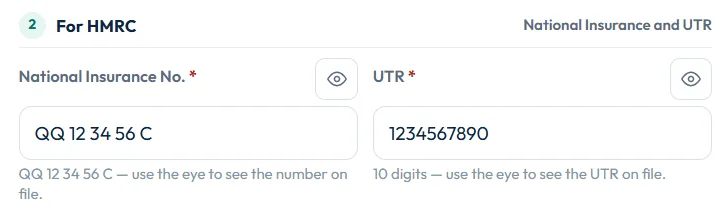
The form checks the digits before you save, so most typing mistakes are caught straight away. If HMRC still rejects the UTR when you file, see UTR fails HMRC’s check.
Still stuck?
- Check you are not using a company or partnership UTR on your personal return.
- Count the digits: a UTR has exactly 10. Leave out any K at the end.
- If you registered recently, allow up to about 15 working days for the letter.
- If you are an accountant, ask the client for an HMRC letter showing the UTR, or check your agent services account.
Still not sorted? Contact us and tell us the page, the tax year and any message you see.
Questions answered
How many digits is a UTR number?
A UTR is 10 digits. Some HMRC screens show it with a letter K at the end. Enter only the 10 digits on your return.
Is my UTR the same as my National Insurance number?
No. Your National Insurance number has letters and numbers, such as QQ 12 34 56 C. Your UTR is 10 digits. Your tax return needs both.
Can I find my UTR online?
Yes. Sign in to your HMRC online account or the HMRC app and open Self Assessment. GOV.UK also has a find your UTR service.
How long does it take to get a UTR?
After you register for Self Assessment, HMRC usually posts your UTR within about 15 working days, and longer if you live abroad.
Does my UTR change each year?
No. Your UTR stays the same for life, even if you stop filing for a few years and then register again.
Can I prepare my return before I have a UTR?
Yes. You can complete the return in Self Assessment Software first. You need the UTR before you can file it with HMRC.
Official sources
These guides explain how HMRC's rules apply in Self Assessment Software. Check GOV.UK for your own circumstances.