
What the SA110 shows
- Income Tax due on all your income, after the Personal Allowance (£12,570 for most people in 2025-26).
- Class 4 National Insurance on self-employed profits.
- Student loan and postgraduate loan repayments, less any taken through payroll.
- Capital Gains Tax, and charges such as the High Income Child Benefit Charge.
- Tax already paid through PAYE and payments on account.
- Payments on account for the next tax year, and any refund due.
How to check your calculation
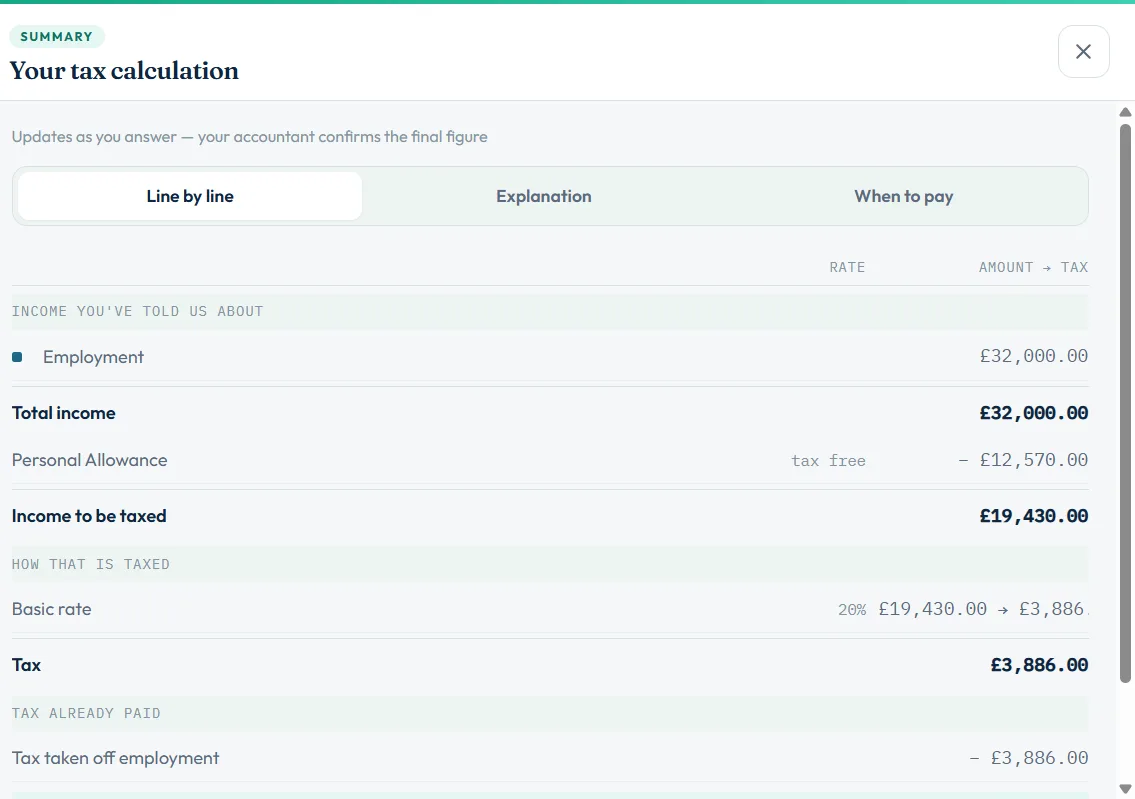
- Open the calculationIn your return, choose See the full calculation. The panel Your tax calculation opens.
- Read Line by lineCheck each income figure matches your pages, then the tax at each rate.
- Read the ExplanationA plain-English summary of how the total was reached.
- Check When to paySee what is due on 31 January and 31 July, and the filing deadline.
- Fix anything that looks wrongGo back to the page with the wrong figure. The calculation updates straight away.
What the When to pay tab tells you
If your bill is over £1,000, HMRC usually asks for half of it again in advance as payments on account, so the January payment is larger than the bill itself. If your bill is under £1,000, you make one payment and nothing in July. See payments on account.
If a refund is due, the panel says so and the refund is claimed when you file.
Questions on the SA110 page
| Question | When to use it |
|---|---|
| Do you want next year’s payments on account to be lower? | If you expect next year’s tax to be lower. See reduce payments on account |
| Repayment (box 16) | Where you want a refund sent |
| Earlier years (boxes 14 to 15) | Adjustments that relate to an earlier year |
| Box 17 note | Required if you reduce payments on account: say why |
Your figure and HMRC’s figure
The calculation in the software is worked out from your return before HMRC sees it. After you file, HMRC produces its own calculation. They should match. If they do not, HMRC writes to you. For mortgages, lenders often ask for HMRC’s version: see what is an SA302.
Still stuck?
- Tax looks too high? Check you have entered tax already paid through PAYE (SA102 box 2).
- Student loan charged twice? Enter the amount deducted by your employer on the SA102.
- January figure bigger than the bill? That is the first payment on account for next year.
Still not sorted? Contact us and tell us the page, the tax year and any message you see.
Questions answered
What is the SA110?
The SA110 is the tax calculation summary page of the Self Assessment return. It shows the tax due for the year, payments on account and any refund.
Do I have to fill in the SA110 myself?
In Self Assessment Software the calculation is worked out for you from your return. You only answer the SA110 questions that apply, such as reducing payments on account or where to send a refund.
Why is my January payment more than my tax bill?
Because it includes the first payment on account towards next year, usually half of this year’s bill.
Is the software calculation the same as HMRC’s?
It is worked out from the same figures and should match. HMRC issues its own calculation after it processes the return.
When do I pay the tax?
The balance for 2025-26 and the first payment on account for 2026-27 are due by 31 January 2027. The second payment on account is due by 31 July 2027.
Official sources
These guides explain how HMRC's rules apply in Self Assessment Software. Check GOV.UK for your own circumstances.