
Before you start
Complete your personal details first: name, date of birth, National Insurance number, UTR and address. These go on every return. If you do not have everything to hand, check the documents checklist.
How to start a return
- Choose Start filingOn the dashboard, choose Start filing. Accountants first open the client: My clients, then the client, then Start a return.
- Check who it is forThe window shows Filing for and the taxpayer’s name. Make sure it is the right person.
- Pick the tax yearIn Tax year, choose the year, for example 6 Apr 2025 – 5 Apr 2026. A year marked already started opens the return you began earlier.
- Choose what you are filingUnder What are you filing? tick Individual / SA100, Partnership / SA800, or both.
- Choose Start FilingThe return opens. For an individual return you land on the SA100 workspace, starting with your details for that year.
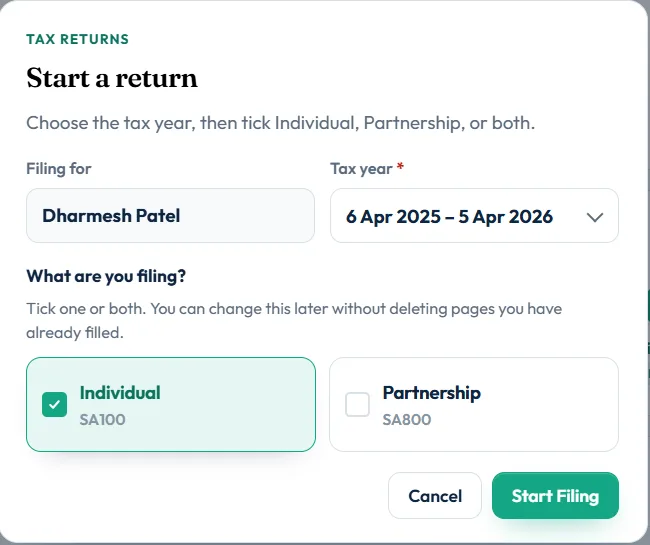
Individual, Partnership or both?
| You are… | Tick | What opens |
|---|---|---|
| Employed, self-employed, a landlord or anyone filing their own return | Individual / SA100 | Your SA100 workspace for the year |
| The nominated partner filing the partnership’s return | Partnership / SA800 | The partnership’s SA800 return. See what is an SA800 |
| A partner who also files the partnership return | Both | Your SA100 first; the SA800 is linked |
| A partner who does not file the partnership return | Individual / SA100 | Your SA100. Add the SA104 partnership pages for your share |
If you tick Partnership and you belong to more than one partnership, you are asked to choose one, or add a new partnership.
Which tax years can I file?
Online filing in Self Assessment Software is for the 2025-26 tax year. If you pick another year, the filing checks explain that the return has to be filed with HMRC directly or on paper.
The online deadline for 2025-26 is 31 January 2027. See the Self Assessment deadline guide.
What happens next
The SA100 workspace walks you through your details for the year, then Income and reliefs, where you choose the pages that apply. See add supplementary pages.
Your work saves as you go, and Save and finish later lets you stop at any point.
Still stuck?
- The window says Choose at least one return. Tick Individual, Partnership or both.
- The year you need is missing from the list? Contact us; years are added when HMRC opens them.
- Accountants: no Start a return button? Check you are inside the right client.
Still not sorted? Contact us and tell us the page, the tax year and any message you see.
Questions answered
Which tax year should I choose?
The year you are reporting. For income from 6 April 2025 to 5 April 2026, choose 2025-26. Its online deadline is 31 January 2027.
Do I need SA100 or SA800?
Almost everyone files an SA100, the individual return. Only the partner responsible for a partnership’s return files the SA800 as well.
Can I change from SA100 to both later?
Yes. You can change the choice later without deleting pages you have already filled.
Does starting a return cost anything?
No. You prepare the return free and pay only when you file it with HMRC.
Can I start a return before I have my UTR?
You need a UTR on your personal details to save them. Register for Self Assessment first; HMRC posts the UTR to you.
Official sources
These guides explain how HMRC's rules apply in Self Assessment Software. Check GOV.UK for your own circumstances.