
Which pages do I need?
| Page | Use it if you had… | Guide |
|---|---|---|
| SA102 Employment | A job, directorship or office holder pay | SA102 guide |
| SA103S / SA103F Self-employment | Income from working for yourself as a sole trader | SA103 guide |
| SA104S / SA104F Partnership | A share of a partnership’s profit or loss | SA104 guide |
| SA105 UK property | Rent from UK property, including Rent a Room above the exempt amount | SA105 guide |
| SA106 Foreign | Income or gains from outside the UK | — |
| SA107 Trusts | Income from a trust or a deceased person’s estate | — |
| SA108 Capital gains | Sales of shares, property, crypto or other assets that need reporting | SA108 guide |
| SA109 Residence | Not being UK resident, or claiming the remittance basis | — |
| SA101 Additional information | Less common income, reliefs and charges | — |
Ministers of religion, members of Parliament and the devolved assemblies, and Lloyd’s underwriters have their own pages (SA102M, SA102MP, SA102MS, SA102MLA, SA102MSP and SA103L). They are listed with the other pages.
How to add pages in Self Assessment Software
- Open Income and reliefsIn your SA100 for the year, go to the Income and reliefs step.
- Open the page listIn On this return, choose CLICK TO SELECT. If you have already ticked pages, the button says Change pages on this return.
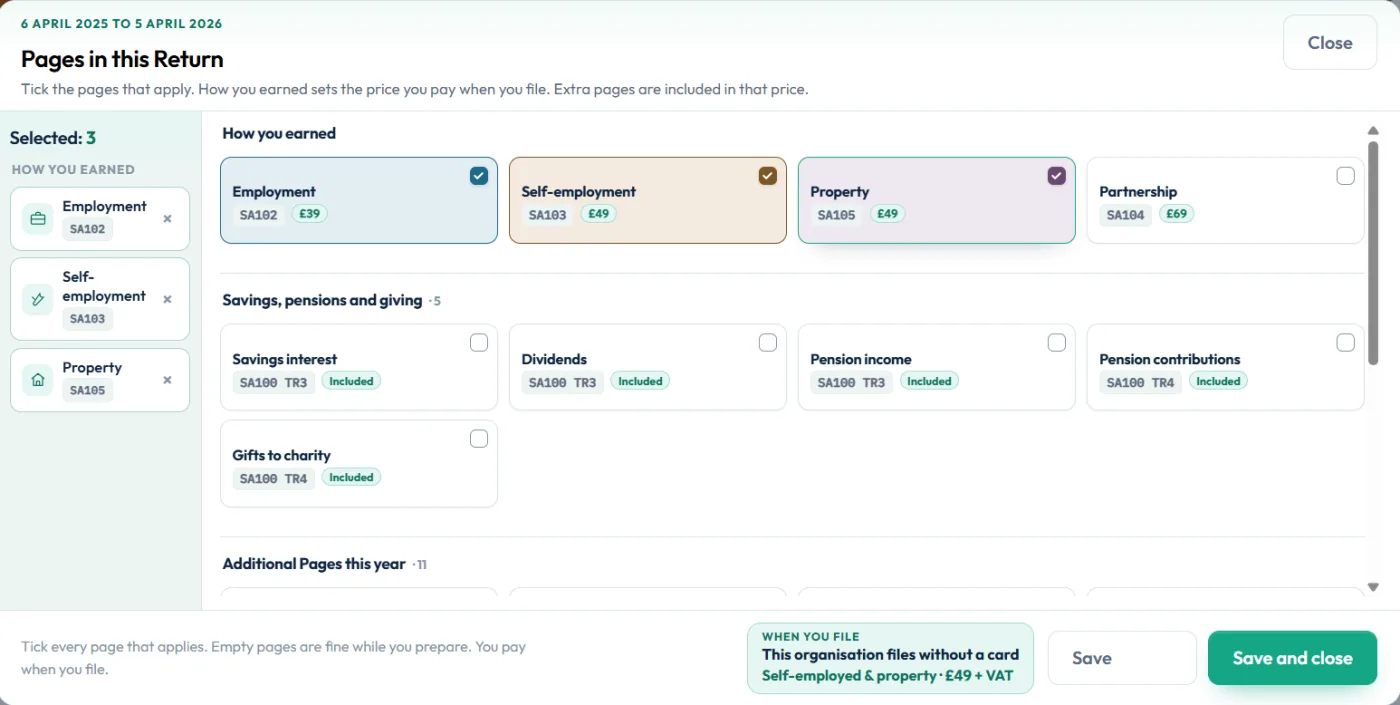
- Tick How you earnedIn Pages in this Return, under 1 How you earned, tick employment, self-employment, partnership or property as they apply.
- Tick the extra pagesTick anything else that applies, such as items under Savings, pensions and giving and Additional Pages this year (student loan, Child Benefit, capital gains, residence). Use the 2 Extra pages tab for the less common pages.
- SaveChoose Save and close. Each ticked topic now appears as a step to fill in.
Filling in a page
Each topic opens a short set of questions. Choose Save and add another if you have more than one of the same thing, such as two jobs, or Save and Close when you are done.
The common boxes are shown first. Less common HMRC boxes sit under More HMRC boxes for this step, so open that only if you need it.
Ticking a choice saves straight away. Typed amounts are saved when you save the page, or when you choose Save and finish later.
Removing a page you do not need
Open Change pages on this return and untick the page. An empty page does not stop you preparing, but a ticked page must be complete before you can file. The filing checks list any page that is ticked but not finished.
Still stuck?
- A page shows as not complete on the filing desk? Open it and fill the missing boxes, or untick it if it does not apply.
- Not sure whether income needs a page? The guided questions ask about each type of income in turn.
- Partnership boxes still at £0.00? They fill in once the partnership statement is finished.
Still not sorted? Contact us and tell us the page, the tax year and any message you see.
Questions answered
What are supplementary pages?
They are extra pages that sit with the SA100 main return for income it does not cover, such as employment (SA102), self-employment (SA103), UK property (SA105) and capital gains (SA108).
Do I need a supplementary page for bank interest?
No. UK savings interest, dividends, pensions and Gift Aid go on the main SA100. Foreign interest goes on SA106.
Does every employed person need SA102?
If you file a return and had a job in the tax year, you normally include an SA102 for each employment, even if tax was taken through PAYE.
Can I add a page after I have started?
Yes. Open Change pages on this return at any time before you file and tick the page.
Does adding pages change the price?
The pages under How you earned set the plan you pay for when you file: employment, self-employed and property, or partnership. Preparing stays free.
Official sources
These guides explain how HMRC's rules apply in Self Assessment Software. Check GOV.UK for your own circumstances.