
SA103S or SA103F: which do you need?
| Short · SA103S | Full · SA103F | |
|---|---|---|
| Turnover | Below £90,000 | £90,000 or more |
| Expenses | By category, or one total if below £90,000 | By category, plus disallowable amounts |
| When else | Simple sole trader business | Transition profit, adjustments, or when HMRC’s short notes say so |
| Boxes | Expenses 11 to 20, allowances 23 to 25.2 | Expenses 17 to 30, disallowable 32 to 45, allowances 49 to 57 |
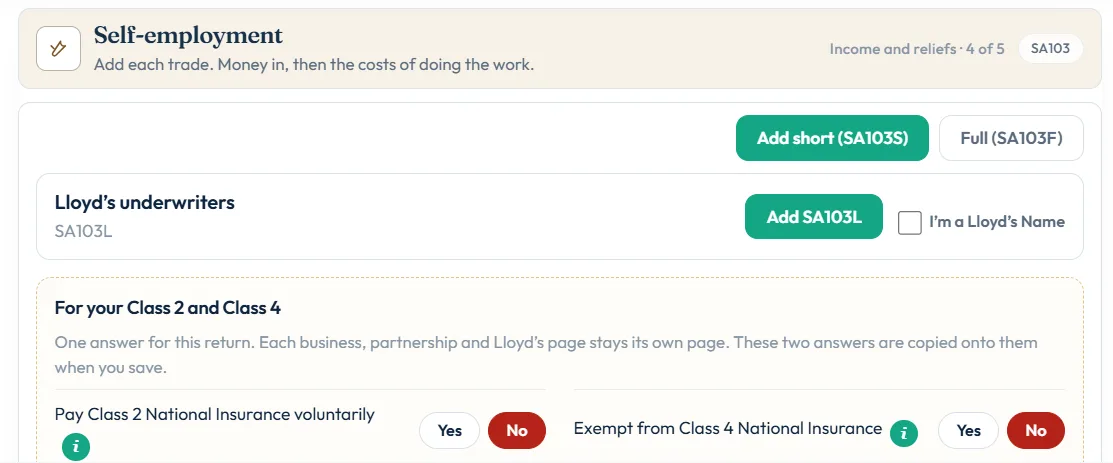
In the Self-employment step choose Add short (SA103S) or Full (SA103F). If you use the short pages with turnover of £90,000 or more, you see Turnover is £90,000 or more. Use the full pages (SA103F).
How to complete the SA103 in Self Assessment Software
- Add self-employmentIn Income and reliefs, open CLICK TO SELECT and tick Self-employment under How you earned. See add supplementary pages.
- Choose short or fullIn the Self-employment step choose Add short (SA103S) or Full (SA103F). You can switch between Short · SA103S and Full · SA103F at the top of the page.
- Business detailsOn 1 Details & income, fill in Business details: description (box 1), postcode (box 2), start or cease dates, the date your accounts are made up to (box 7) and whether you used traditional accounting rather than cash basis (box 8).
- IncomeEnter Your turnover in box 9 and any other business income in box 10. To claim the £1,000 allowance instead of expenses, use Trading income allowance (box 10.1).
- ExpensesEnter allowable expenses in boxes 11 to 19, or, with turnover below £90,000, one total in box 20. See allowable expenses.
- Profit, allowances and NIOn 2 Profit, allowances, NI, add capital allowances, any losses and the National Insurance questions, then choose Add business to save.
Capital allowances
If you bought equipment, tools, machinery or a vehicle for the business, you usually claim capital allowances instead of putting the cost in expenses. The Annual Investment Allowance gives full relief in the year for most equipment. Cars are treated differently and usually go in a pool at 18% or 6% a year, depending on emissions.
If you use the cash basis, most equipment costs go straight into expenses instead. Cars are the main exception.
If you made a loss
You can set a loss against other income of the same or previous year, carry it back, or carry it forward against future profits of the same trade. The short pages use boxes 29 and 32 to 35; the full pages use 74 and 77 to 80. Enter a profit or a loss, never both.
Check your tax computation
Choose See the full calculation to see your profit, Income Tax and Class 4 National Insurance line by line. For 2025-26, Class 4 is 6% on profits between £12,570 and £50,270 and 2% above that. In For your Class 2 and Class 4, answer Pay Class 2 National Insurance voluntarily and Exempt from Class 4 National Insurance once for the return.
Still stuck?
- Turnover close to £90,000? Check the total before you file; £90,000 or more needs the full pages (SA103F).
- Trading allowance message? You cannot claim it and expenses together. Pick one.
- Self-employment page is complete not ticked on the filing desk? Check the business details, dates and turnover.
Still not sorted? Contact us and tell us the page, the tax year and any message you see.
Questions answered
What is the difference between SA103S and SA103F?
SA103S is the short self-employment page for turnover below £90,000 and simple affairs. SA103F is the full page for turnover of £90,000 or more or more complex cases.
Can I use SA103S if my turnover is £90,000?
No. Turnover of £90,000 or more needs the full SA103F pages.
Do I have to list every expense?
If your turnover was below £90,000, you can enter your total allowable expenses as one figure in box 20 of the short pages. Keep records of the detail.
Do I pay Class 2 National Insurance?
From April 2024 self-employed people no longer have to pay Class 2. If your profits are below the small profits threshold you may choose to pay it voluntarily to protect your State Pension.
Can I claim the trading allowance and expenses?
No. You claim either your actual expenses or the £1,000 trading allowance.
Official sources
These guides explain how HMRC's rules apply in Self Assessment Software. Check GOV.UK for your own circumstances.