
Who needs the SA102?
If you file a Self Assessment return and were employed at any time in the tax year, you normally include an SA102 for each job, even when PAYE has already taken the tax. The return has to show all your income so HMRC can work out the right total.
Company directors use the SA102 for their salary and benefits. Ministers of religion and members of Parliament or the devolved assemblies use their own versions: SA102M, SA102MP, SA102MS, SA102MLA and SA102MSP.
What goes where
| Box | What to enter | Where to find it |
|---|---|---|
| 1 | Pay from this employment, before tax | P60 (or P45 if you left in the year) |
| 1.1 | Benefits your employer taxed through payroll | Payslips or a letter from your employer |
| 2 | UK tax taken off the pay in box 1 | P60 or P45 |
| 3 | Tips and other payments not on your P60 | Your own records |
| 4 to 5 | Employer’s PAYE reference and name | P60 or payslip |
| 6 to 7.4 | Director and close company questions | Only if you were a director |
| 9 to 16 | Benefits: cars, fuel, medical insurance, vouchers, accommodation, other benefits and expense payments | P11D from your employer |
| 17 to 20 | Work expenses you paid and were not repaid | Your receipts |
Student loan repayments taken through your pay go in the Student loan section of the job: tick that the Student Loans Company told you repayment was due, pick your plan type and enter Student Loan deducted by your employer from your P60. It is credited in your tax calculation.
How to complete the SA102 in Self Assessment Software
- Add the employment pageIn Income and reliefs, open CLICK TO SELECT and tick Employment under How you earned. See add supplementary pages.
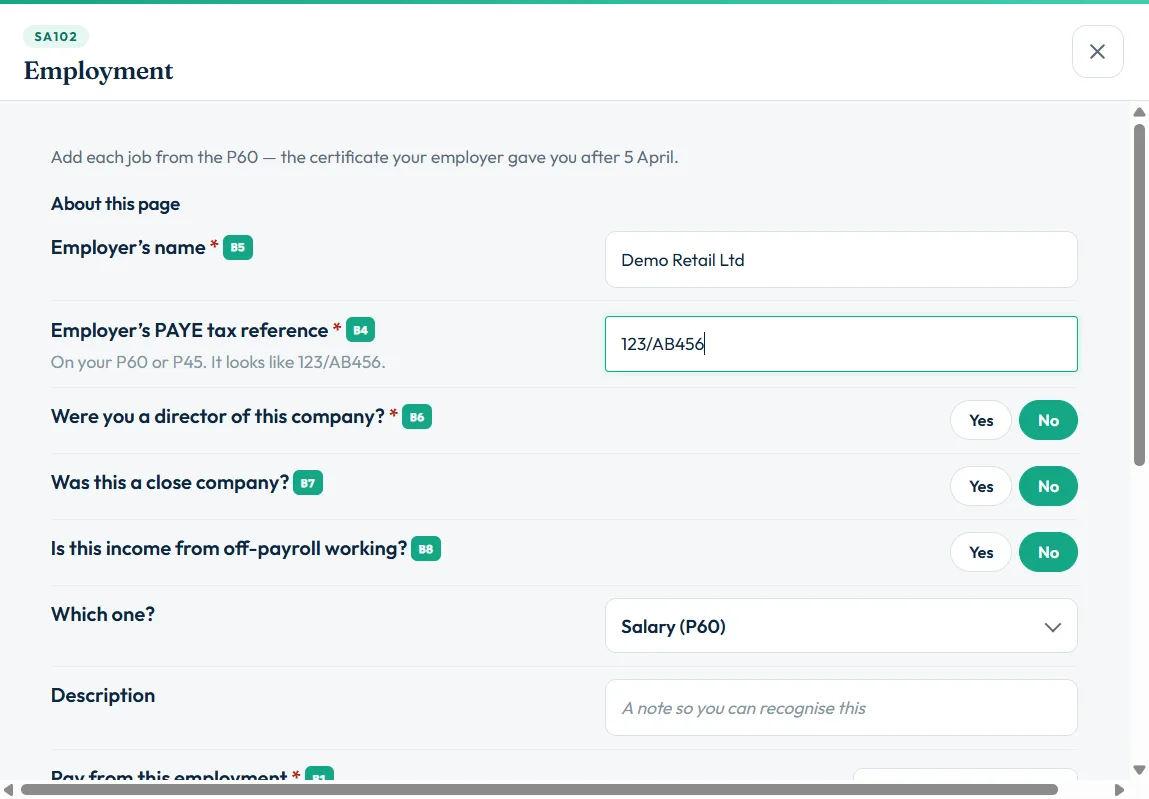
- Choose Add a jobIn the Employment step, choose Add a job. Enter the Employer’s name (box 5) and Employer’s PAYE tax reference (box 4, on your P60 or P45), and answer the director, close company and off-payroll questions.
- Enter your pay and taxUnder Which one? choose Salary (P60) and enter Pay from this employment (box 1) and Tax already paid (box 2). If you left the job, choose Salary (P45) instead. If the tax figure has an R next to it, enter it as a minus.
- Add benefits, tips or lump sumsChoose Benefits (P11D) and copy each figure from your P11D, or Tips, Lump sums or Redundancy payment if they apply.
- Add expenses you paidIn General expenses, add Travel and subsistence, Professional fees and subscriptions, Mileage allowance, Flat rate expenses or Working from home.
- SaveChoose Save and add another for a second job, or Save and Close.
Employment expenses you can claim
You can claim costs you had to pay to do your job, which your employer did not pay back. Common examples are professional subscriptions on HMRC’s approved list, business travel (not your normal commute), and specialist clothing you must buy and clean yourself.
If your employer paid you a mileage allowance below HMRC’s approved rates, you can claim the difference: enter your business miles and what your employer paid under Mileage allowance, and the software works out the claim using HMRC’s rates. Keep receipts and records: you do not send them, but HMRC can ask for them.
More than one job
Add a separate SA102 for each employment, including jobs you left during the year. Choose Add another job, or Save and add another while you are in the questions.
Still stuck?
- No P60? Use the final payslip of the tax year or your P45, or check the figures in your HMRC online account.
- Pay in box 1 looks too high? Check you have not added benefits already taxed through payroll twice (box 1.1).
- Filing desk says Employment page is complete is not ticked? Open the page and fill box 1, box 2 and the employer details.
Still not sorted? Contact us and tell us the page, the tax year and any message you see.
Questions answered
What is the SA102 form?
The SA102 is HMRC’s employment page. It sits with the SA100 tax return and reports pay, tax, benefits and expenses from a job or directorship.
Do I need an SA102 if I pay tax through PAYE?
If you file a Self Assessment return, yes. Your return must include all your income, even pay already taxed through PAYE.
Where do I find the figures for box 1 and box 2?
On your P60, or your P45 if you left the job during the tax year. Box 1 is pay before tax and box 2 is the UK tax deducted.
Where do P11D benefits go?
In boxes 9 to 16 of the SA102, copied from the P11D your employer gives you.
I had two jobs. Do I need two SA102s?
Yes. Complete a separate SA102 for each employment in the tax year.
Official sources
These guides explain how HMRC's rules apply in Self Assessment Software. Check GOV.UK for your own circumstances.